← Vocabulary Trainer Vocabulary Trainer

Maybe you're not bad at languages.
Maybe you just learned the wrong way.

DIKIWI

Your intelligent vocabulary trainer for lasting learning

Learn the way your brain actually stores language.
From memorizing to understanding. For lasting learning in your long-term memory.

Who DIKIWI is made for

  • – for learners aged 9 and up
  • – for school, university, work, and independent learning
  • – for 30 European source and target languages
  • – as a standalone learning tool or a complement to the DIKIWI language course
  • Whether you're studying for school, preparing for exams, or need a language for work – the learning system stays the same.

DIKIWI – AI Vocabulary Trainer

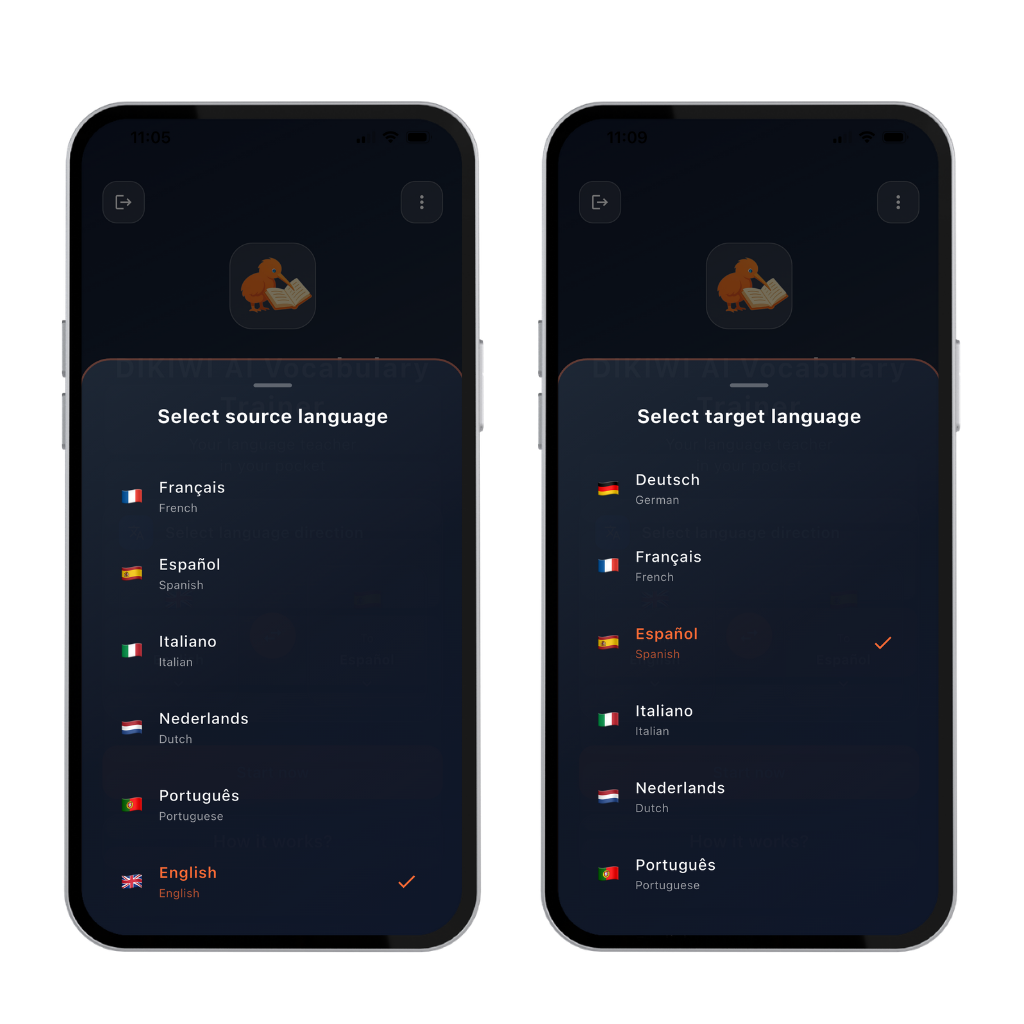
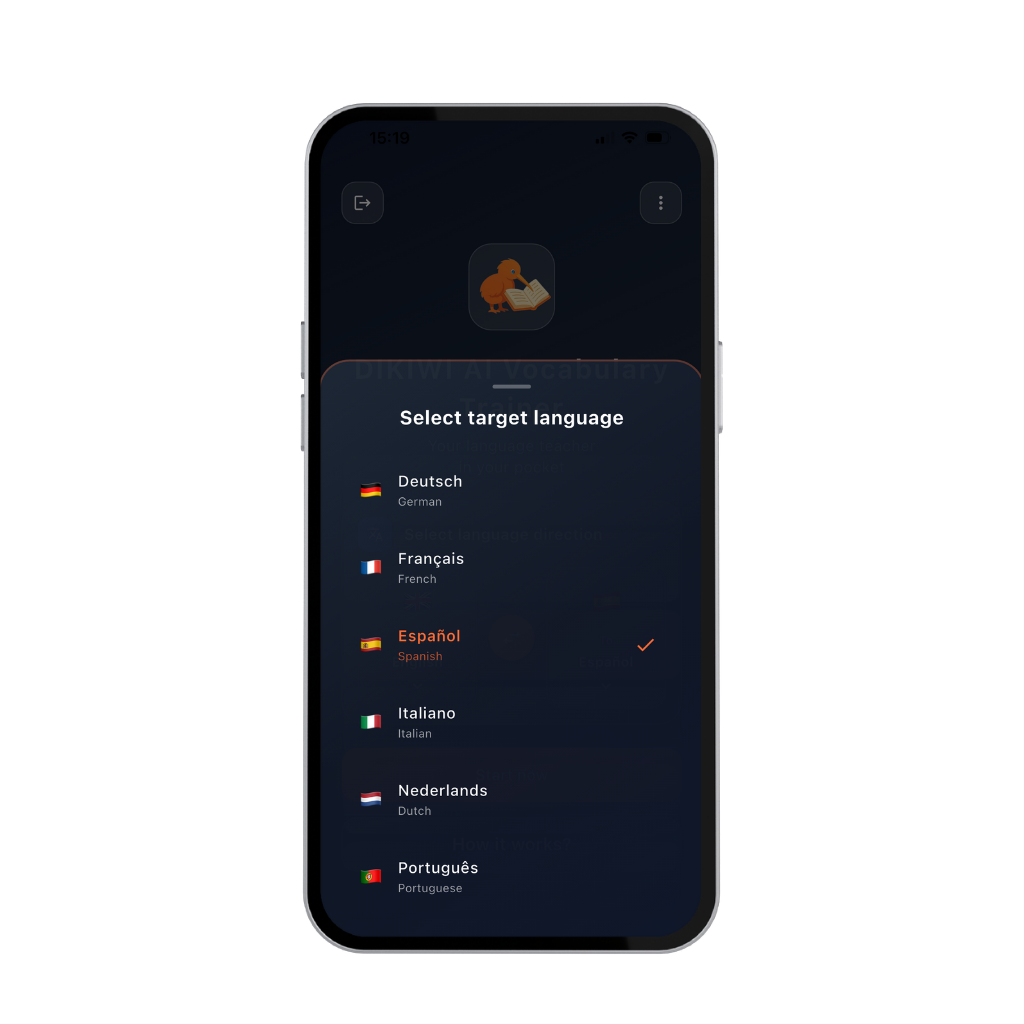
Select source language and target language in the DIKIWI Vocabulary Trainer
Fig. 1    Fig. 2

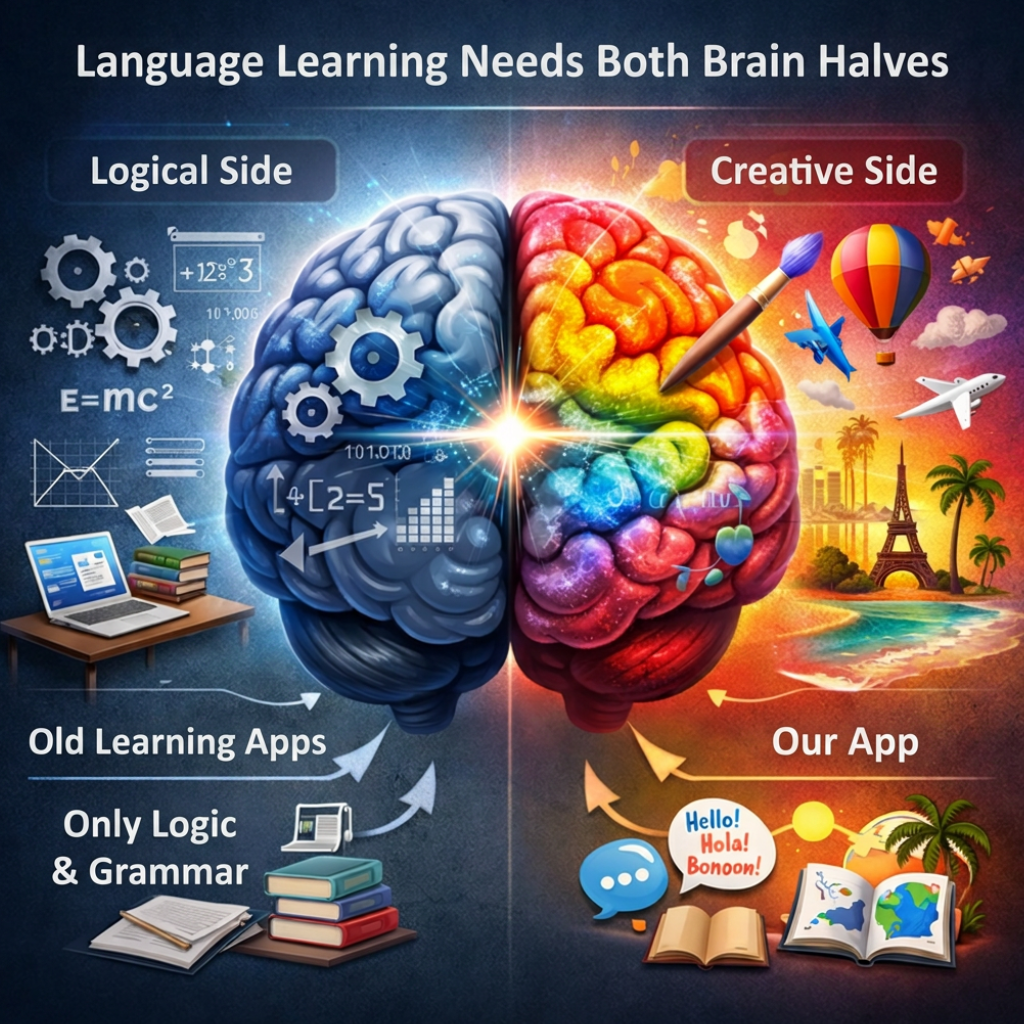
Language Learning Needs Both Halves of Your Brain

Most apps only train logic and grammar. We activate both sides of your brain.

Born out of the practice of a complete language course.
Further developed as a standalone tool for lasting vocabulary building.


Language learning needs both halves of the brain – logical and creative side
Fig. 3

🧠 Logical Side

Rules, grammar, structures – these matter. But if you only train the logical side, language stays abstract and mechanical.

🎨 Creative Side

Feeling, context, application – this is where a real feel for language develops. Only with both sides does language become alive and natural.

🧠 DIKIWI Combines Both

DIKIWI combines structure, repetition, meaning, and application. This way you don't just learn vocabulary for the next test – you develop a real feel for the language, step by step. You provide the content – DIKIWI handles the learning logic.

What Makes the Vocabulary Trainer Unique?

Most vocabulary trainers train your short-term memory.
DIKIWI trains your long-term memory.

Instead of memorizing vocabulary in isolation, DIKIWI connects meaning, context, and application.

Every exercise is built so your brain recognizes connections – and doesn't just memorize language, but understands it.

This creates lasting learning without mindless cramming: step by step, traceable, and with real learning progress.

DIKIWI – your intelligent tool for lasting language learning.

The annual subscription costs less than two tutoring lessons per year.

How Learners Experience DIKIWI

"I notice that I actually retain vocabulary – not just for a few days."

– Student, 22

"Finally I can see exactly which words are really in my long-term memory."

– High School Teacher

"This isn't a game – it's a learning system."

– Language Course Participant

Free: €0 with ads
Annual plan: approx. €7 per month
Monthly plan: approx. €12
Prices may vary slightly between the App Store and Google Play.
All AI modules unlocked • cancel anytime

📱

What Do You Get in the DIKIWI App?

A complete learning system – clearly structured for learners and teachers.
Seven areas that work together meaningfully
Learning logic, control, progress, vocabulary expansion, flexible input, repeatability, and multilingualism – in one tool that adapts to your learning content.

📚

7 Key Areas – Clear, Complete, and Controllable

  • 🧠 Learning Logic:
    4-stage vocabulary training –
    1. Learn · 2. Practice · 3. Reinforce · 4. Learned
  • ✍️ Written Check & 🗣️ Pronunciation Check (AI Module):
    Every word can be tested and evaluated by hand or digitally.
    Pronunciation checking is currently available for selected languages.
    The quality of the pronunciation analysis depends on external AI models, which evolve at different speeds depending on the language.
  • 📊 Documented Learning Progress:
    Learning speed, repetitions, and the status of every single word – traceable and controllable.
  • 📖 Vocabulary Expansion (AI Module):
    Integrated dictionary for looking up idioms, word groups, and context.
  • 🗂️ Flexible Vocabulary Input:
    Manually · tables via phone camera (AI module) · directly from the dictionary (AI module).
  • 🔄 Repeatability:
    Words you've already learned can be deliberately marked as "not learned" again.
  • 🌍 Multilingualism:
    The target language can be changed at any time.
Why this matters:
Learning becomes plannable, verifiable, and controllable – instead of random and dependent on gut feeling.

For Teachers & Learners DIKIWI is not a replacement for teaching – it's a tool.
Teachers determine content and level. Learners work independently, in a structured and verifiable way.
Results are transparent – as a basis for feedback and planning.
Image: Dikiwi App - Lesson Overview
Fig. 4
🧠

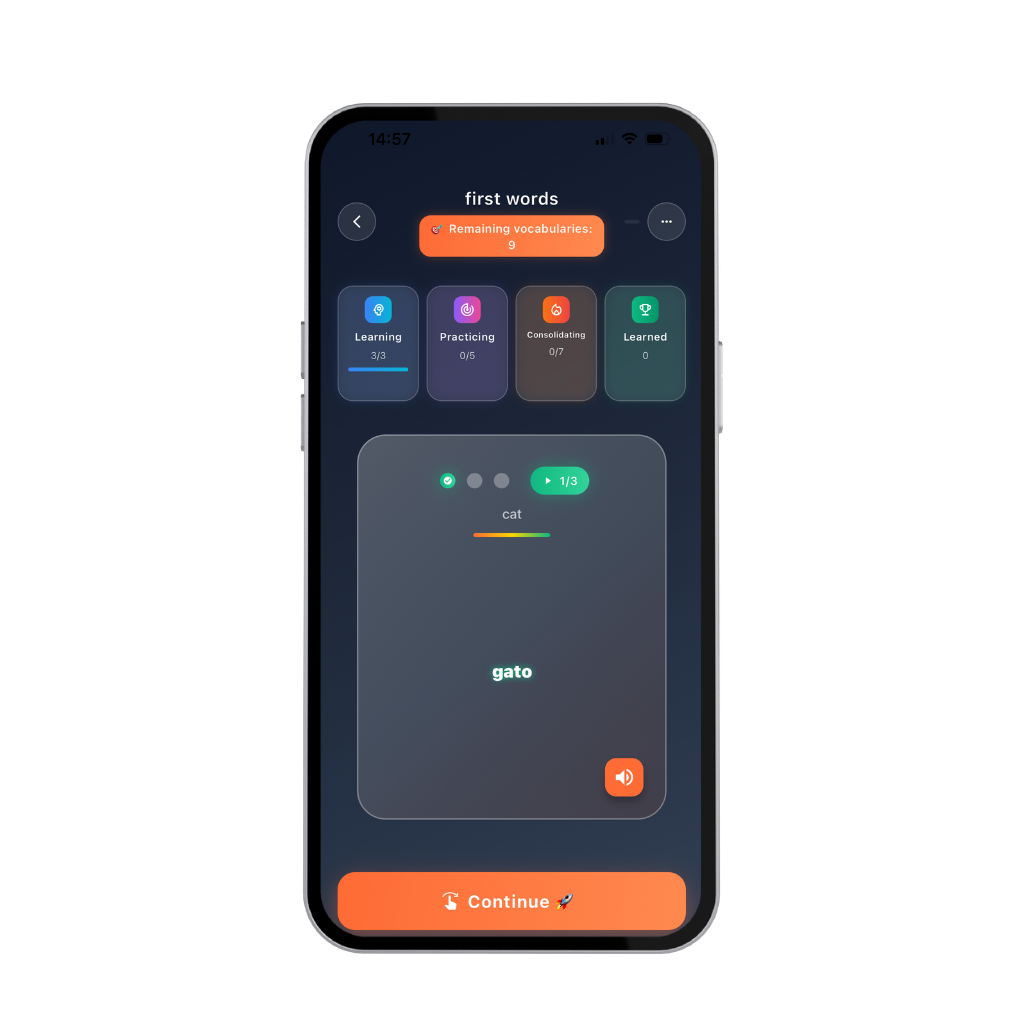
No. 1 – Learning Logic: From First Contact to Long-Term Memory

The 4-stage learning system is scientifically proven and ensures maximum learning efficiency.
The learning logic is simple and easy to follow.
1. Learn - 2. Practice - 3. Reinforce - 4. Learned.

Your journey into long-term memory begins.
Without great effort. Without rote memorization.

From memorizing to lasting retention –
with proven NLP methods.
Dikiwi App – Learning (Short-Term Memory)
Fig. 5
✍️

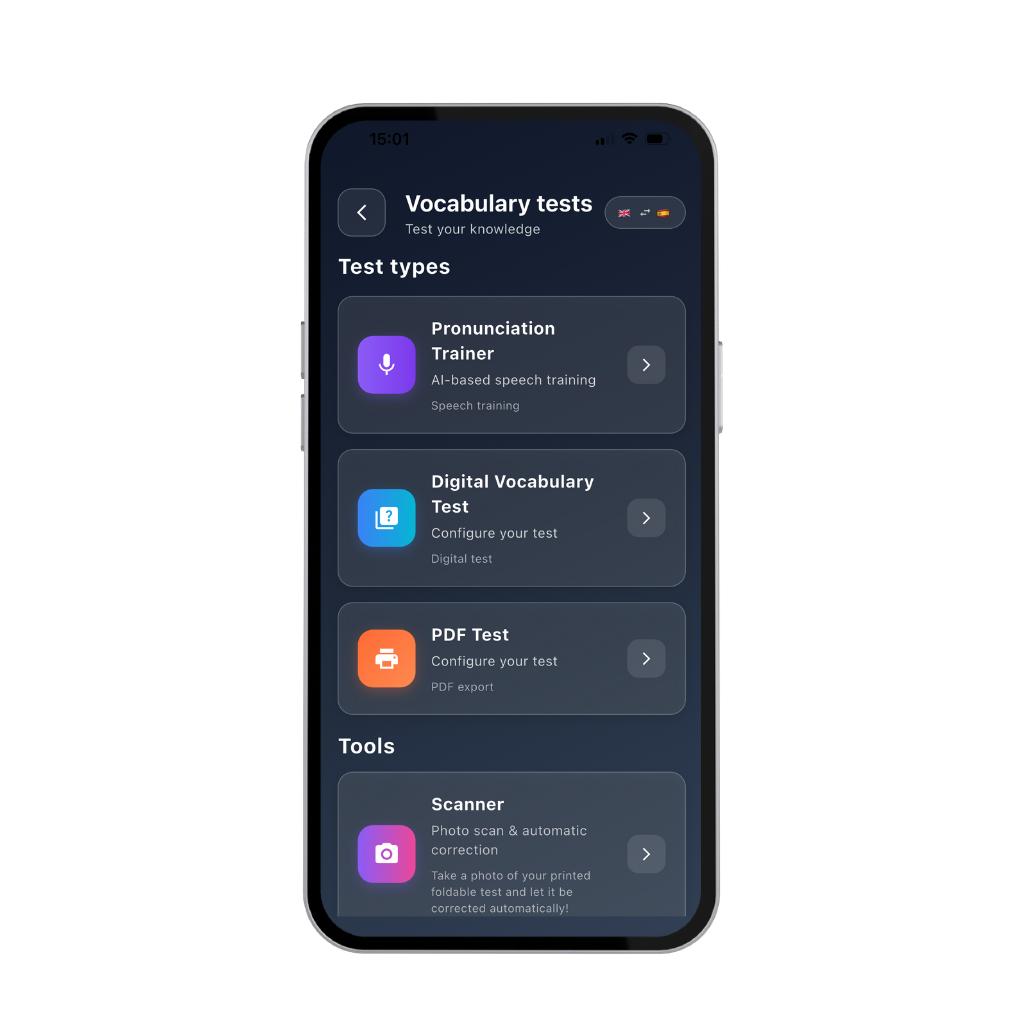
No. 2 – Control: Targeted Checking of Pronunciation and Writing

AI-powered module

We distinguish between pronunciation and writing. See 'Test Types'

Pronunciation Trainer: Your pronunciation is compared with 10,000 native speakers.
You see, as a percentage, how well you're understood – and improve noticeably in a short time with AI tips.

Digital Test: Instant feedback on whether you wrote it correctly – including clear error highlighting.

Handwritten Test (PDF): You write on paper – possible after as little as 15 minutes of learning. Just take a photo, and the AI evaluates everything – like a teacher's correction.
Dikiwi App – Testing Your Knowledge
Fig. 6
📈

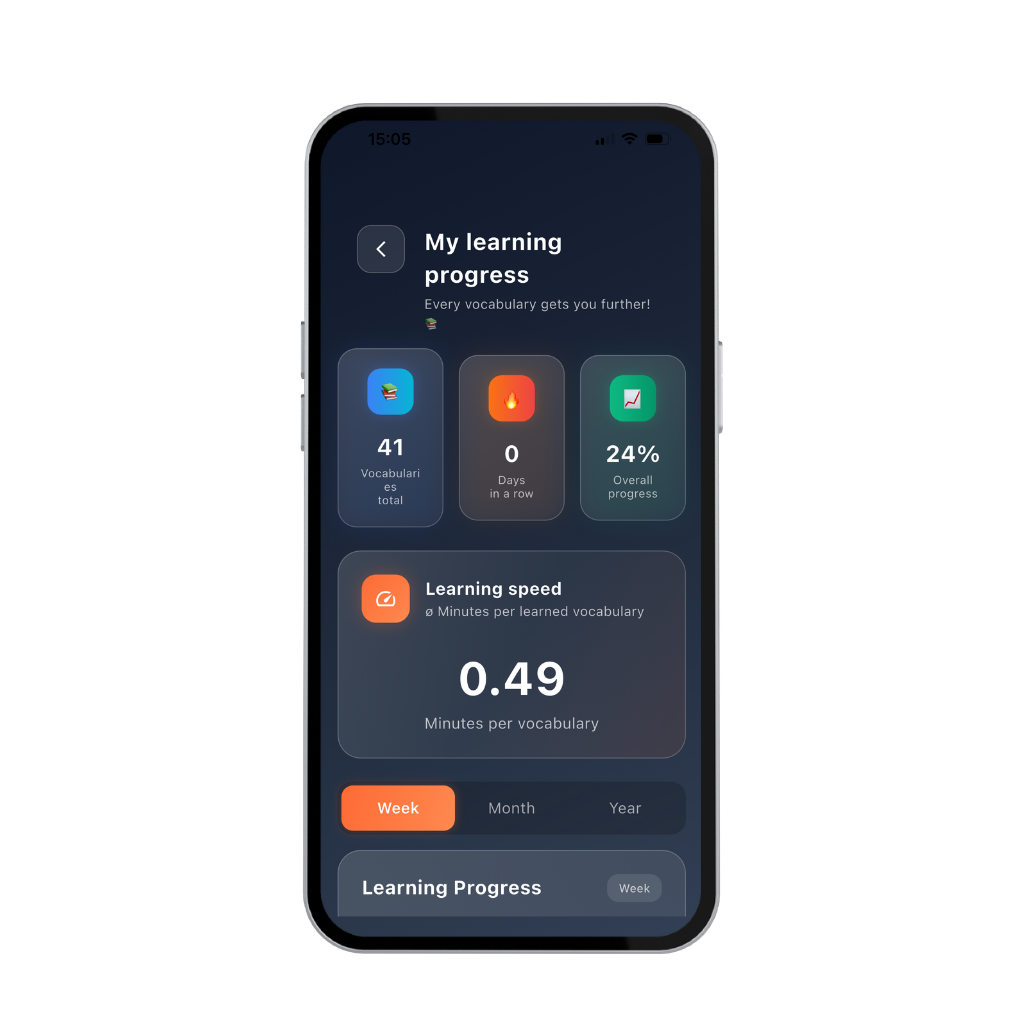
No. 3 – Learning Progress: See What You've Really Achieved

Learning only becomes lasting once you see what you've already achieved.

What Dikiwi shows you:
• A clear overview of your entire learning journey
• Measurable progress – traceable and controllable
• Statistical evaluations showing what you've actually learned

Why this matters:
You're motivated while learning –
but here's what really matters:

You get honest feedback,
like a personal learning diary.

No guessing. No gut feeling.
Facts. Progress. Development.
Dikiwi App – My Progress
Fig. 7
📖

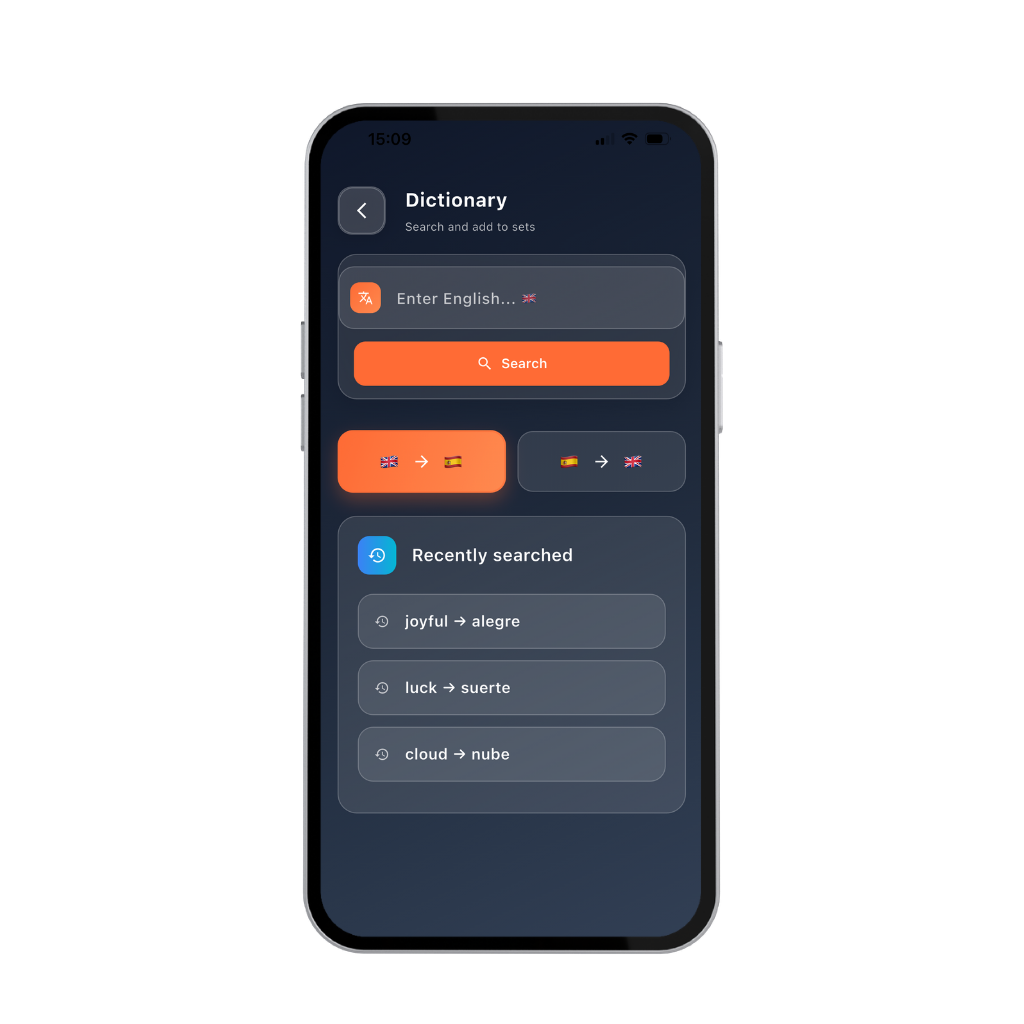
No. 4 – Vocabulary Expansion: Understand More Without Losing Your Flow

When learning really works, the desire to understand more, know more, and become more precise arises naturally. AI-powered module.

Everything is in this app.

Dikiwi deliberately relies on a closed learning system.
Because that's exactly how language deepens:

naturally, playfully, and lastingly.

You stay in the language. In your thinking. In your learning.
Without stepping out. Without losing focus.

An AI-powered dictionary is available to you at any time –
for meanings, synonyms, and the right context.

This way you can build your own vocabulary list.
Dikiwi App – Dictionary
Fig. 8
📄

🗂️ No. 5 – Flexible Vocabulary Input: Import Content Quickly and Precisely

AI-powered module

Everything is practical, adaptable, and tables can be imported.

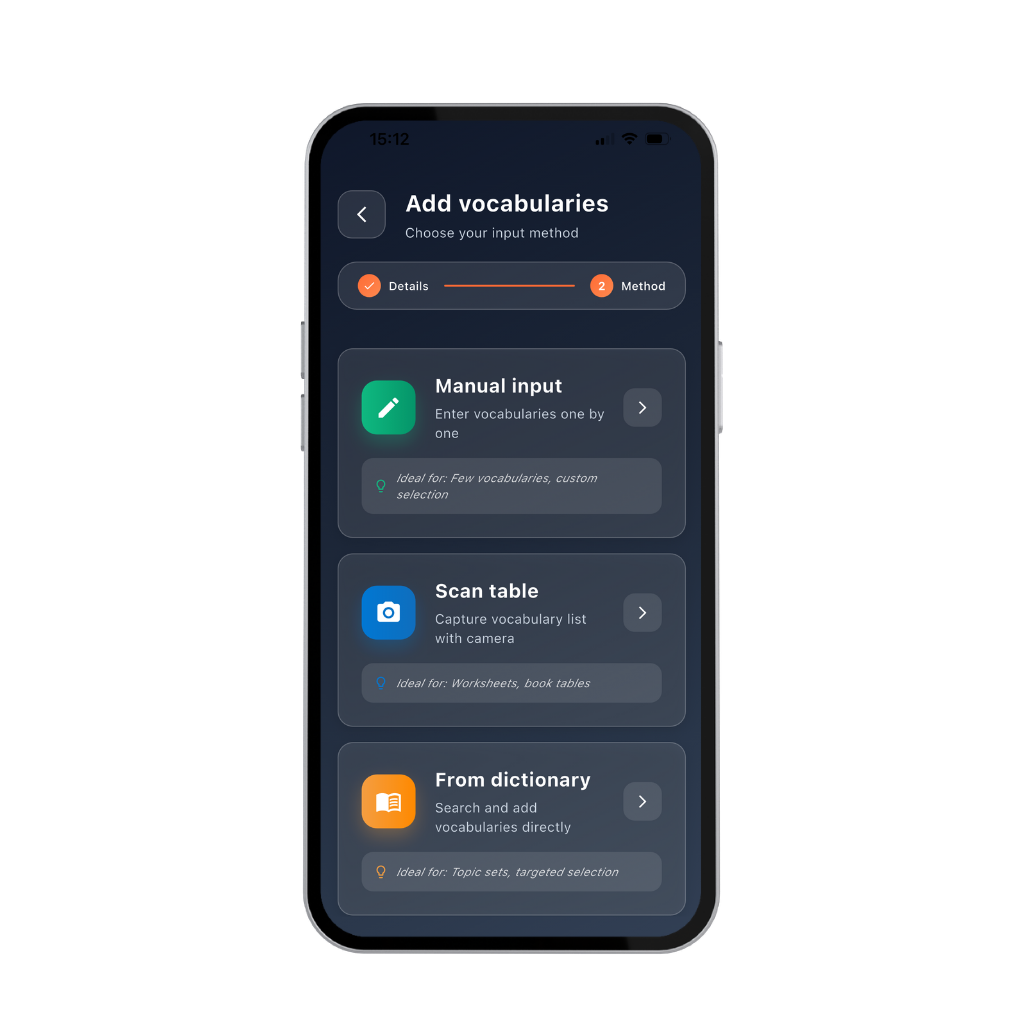
You get three ways to bring the vocabulary you want to learn into the app:

📘 Enter Manually
Enter each word yourself, one at a time.

📗 Scan a Table
Capture the vocabulary list with your phone's camera.

📙 From the Dictionary
Search for words and add them directly

Dikiwi App – Ebooks
Fig. 9
🔄

No. 6 – Repeatability: You Decide What Really Sticks

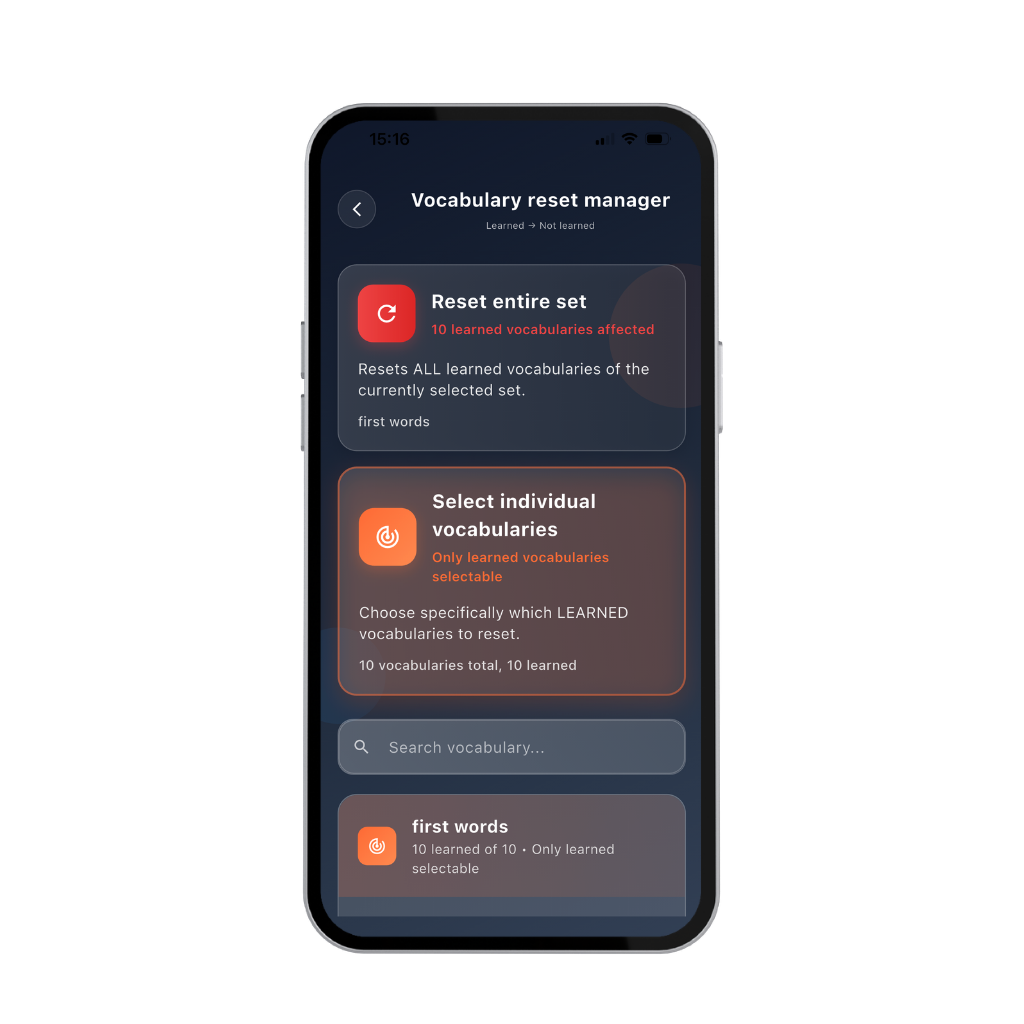
Vocabulary Reset Manager

Dikiwi's principle:
A word only counts as learned once it has truly arrived in your long-term memory.


You decide what really sticks.

In practice, nobody learns everything 100% right away.
Sometimes a correction is needed – and that's exactly what the Vocabulary Reset Manager is for.

✔ Every single word can be reset
✔ Entire lessons can also be reopened
✔ Words already learned can be deliberately marked as "not learned" again

Especially once you're more advanced, you may sometimes want to check:
How well do my first words still stick?

You're in control – not the app.
Dikiwi App – Vocabulary Reset Manager
Fig. 10
🌍

No. 7 – Multilingualism: One Learning Logic for Multiple Languages

The target language in DIKIWI can be changed at any time – no new setup, no new app.

What this makes possible:

✔ Learn English, Spanish, Italian, French, Latin, etc. in parallel
✔ Clear separation between languages – with the same learning logic
✔ Ideal for secondary schools & multilingual schools
✔ Ideal for learners studying multiple foreign languages at once

The language changes – the learning system stays stable.
DIKIWI Multilingualism
Fig. 11

A Complete Learning Ecosystem

Everything you need for successful language learning – bundled in one thoughtfully designed app

No more 9 different apps
Everything in one app – clear, intuitive, effective

DIKIWI is permanently free to use – with ads.
You decide for yourself whether you want a subscription.

💎

Start Your Learning Journey Now

Choose the right plan for you

Free
€0
per month
With ads
5 free credits per AI module included. Used-up credits can be topped up for free by watching ads.
No trial period. No expiration date.
You can learn for free, permanently.
✓ All AI-powered modules included
✓ Upgradeable
Monthly Plan
€12
per month (from €12)
The App Store and Google Play handle this differently, so this is an approximate figure.
Flexible
Renews month by month
✓ All AI-powered modules included
✓ Cancel monthly
✓ Upgradeable
Recommended
Annual Plan
€85
approx. €7 per month (from €85)
The App Store and Google Play handle this differently, so this is an approximate figure.
This investment costs less than 2 tutoring lessons per year.
You save €71
compared to the monthly plan
✓ All AI-powered modules included
✓ Cancel anytime

👉 Before You Get Started (one-time)

Many people's first thought about AI learning apps is: "This is probably complicated."
It's not.

DIKIWI gives you exactly the freedom you need.

🚀 Get Started Right Away

With "Start Now" you can try the vocabulary trainer directly without registering.

Ideal if you simply want to get started – no commitment.

🔐 Sign In or Register

If you want to save your learning progress, you can sign in or register.

DIKIWI uses a platform-independent solution that saves your intermediate results.

✔ Your learning progress is preserved
✔ You can work on different devices
✔ Independent of manufacturer or operating system

If you don't need this synchronization, "Start Now" is entirely sufficient.

DIKIWI Start Screen
Fig. 12
DIKIWI Sign-In – Login
Fig. 13

🔒 Your data belongs to you.
Registration only if you want to learn across multiple devices.

Getting Started: Enter Your First Words (Manually)

You don't need any setup. No tutorial.
Just 4 steps – then the vocabulary trainer is up and running.

1
➕ Click "New Set"
Starts your new folder
Tap + New Set.
Step 1: New Set
Fig. 14
2
📁 Name Your Set
e.g. "mascotas"
Give the set a name → Continue.
🧩 For advanced users (optional):
You can also break sets down further – this isn't required, but it's ideal for structured learning.

• Animals – Farm
• Animals – Wildlife
• Travel – Airport
• Travel – Hotel
• School – Math
• School – Biology
Step 2: Name the Set
Fig. 15
3
✍️ Enter and Save a Word
Example: dog → perro
Type in the word:
dogperro
Then tap "Save" and continue the same way.
Step 3: Enter a Word
Fig. 16
4
▶️ "Start Learning" – Done
The folder appears instantly
Your new folder "mascotas" appears under "My Vocabulary Sets".
Click "Start Learning" – and you're straight into learning mode.
Step 4: My Vocabulary Sets
Fig. 17
1
2
3
4

Getting Started: Enter Your First Words (with Your Phone Camera)

Example: Latin Class
23 words loaded in 2 seconds.

Latin Textbook Medias in Res
Fig. 18
1
📁 Set Up a Set
e.g. Latin – Lesson
📁✏️ Create your set – just like with manual entry.
Set name: Two Roman Girls
Description (optional): Ecce romani – chapter 1
click the button: Continue
Step 1: Create New Set (Latin)
Fig. 19
2
📸 Select "Scan Table"
no preparation needed
Now choose the method
📸📄 "Scan Table" – ideal for textbook pages & worksheets.
Latin – Selecting Scan Table
Fig. 20
3
🔍 Start the Scan
DIKIWI recognizes everything automatically
Hold your phone directly over the table.
Position the table within the frame – start the scan.

🎯🗣️ Left → source language;
🏠📘 Right → target language.
Latin – Starting the Scan
Fig. 21
4
⚡ Start Learning – Done
everything ready instantly
23 words are in the system in about 2 seconds, under the name 'Two Roman Girls' from 'Ecce romani', chapter 1'.
Automatically assigned to the set –
Click "Start Learning". That was your entire prep work. 🙂🍀
Latin – Starting to Learn
Fig. 22

These screens will become familiar to you.
Learning will feel easy.

Your language teacher in your pocket