6.3 Detailed walkthrough of the upper learning screen
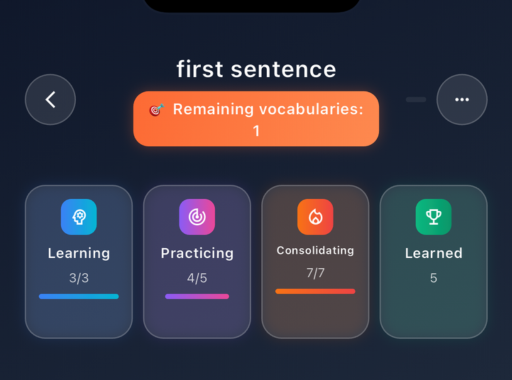
Fig. 1: Upper section of the learning screen
What you see here: At the very top, the title of the selected vocabulary set appears – in this case 'first sentence'. Below that, you see the number of remaining vocabulary items – Remaining items: 1
Next, the integrated 4-stage memory model is displayed (see previous video). In this example, the set consists of 6 vocabulary items: 5 vocabulary items have already completed the learning phases, and one item is still open.
Show step-by-step in the video
1. At the very top, you see the title of the current vocabulary set
2. Directly below, you see the number of remaining vocabulary items
3. Below that, the integrated 4‑stage memory model appears
4. Each category has its own counter
5. The counters show how many vocabulary items are currently in each learning phase and display the current learning progress
The upper section of the learning screen serves as your orientation area. At any time, you can see how many vocabulary items are currently being learned, practised, consolidated, or already marked as learned. This allows you to keep track of your current learning progress at all times.